August 6, 2026 • Roxanne Flair • 11 min reading time • Prices verified June 4, 2026
DJ Mixers Without a Controller: Four-Channel Standalone Options for Turntable and Source DJs
A DJ mixer is, at its most basic, a box that lets you connect multiple audio sources — turntables, CD players, a laptop, a microphone — and blend them together before the signal goes to your speakers. You control the volume of each source independently, fade between them, and shape the sound with EQ (bass, mid, and treble knobs). That’s it. A DJ controller, by contrast, is a combined unit that bundles a mixer and physical jog wheels or platters that control software on a laptop. Controllers are great for bedroom laptop DJs, but if you’re running actual turntables, CDJs (standalone CD and media players), or a mix of hardware sources, a standalone mixer — one that works without being tethered to software — gives you more routing flexibility and usually better audio signal quality per dollar. This guide is for that buyer: the vinyl head who just picked up a second Technics, the mobile DJ building out a hardware rig, or the home-studio person routing a bunch of gear who kept finding four-channel standalone options frustratingly hard to locate. We’ll walk through the real options, the real tradeoffs, and who should buy what.
Why Four Channels, and Why “Standalone” Matters
Before we get into specific units, let’s be precise about what we’re shopping for, because the market conflates these things constantly.
Four channels means four separate input strips, each with its own volume fader and EQ. For a two-turntable setup plus a media player and a microphone — or two CDJ decks, a laptop output, and a sampler — four channels is the practical minimum. Two-channel mixers force you to choose what to connect. Six or more channels push you into live-sound territory and usually add cost without DJ-specific features.
Standalone means the mixer processes and routes audio on its own; it doesn’t require a connected laptop running DJ software (like Serato or Traktor) to function. Some mixers have USB audio interfaces built in, which is a bonus for recording mixes or routing audio to a computer, but the mixer itself works with or without that connection. This is the defining feature for turntable DJs and hardware-source DJs — your rig runs even when the laptop is off.
Phono preamp inclusion is the third variable. Turntables with standard cartridges output a very quiet signal at a specific frequency curve (the RIAA curve) that needs amplification and correction before it sounds right through a mixer. A mixer with a built-in phono preamp handles this on the channel strip itself — you flip a switch from LINE to PHONO. Without it, you need an external preamp between the turntable and the mixer. Most DJ mixers in this category include at least two phono-capable inputs; we’ll flag when they don’t.
The Four-Tier Landscape: What You Actually Find at Each Price Point
Here’s a grounding summary before we dig in:
| Tier | Price Range | Representative Unit | Best For |
|---|---|---|---|
| Entry | Under $100 | Numark M6 USB | Bedroom setup, Traktor hybrid rigs |
| Mid-entry | $100–$200 | Numark M2 | Small venue mobile, clean 2-source setups |
| Mid-pro | $250–$500 | Yamaha MG10XU | Home studio crossover, quality-first buyers |
| Budget avoid | Under $80 | Boytone 8-channel | — (see warning below) |
Numark M6 USB: The “Cheapest Usable 12-inch” Option That Actually Exists
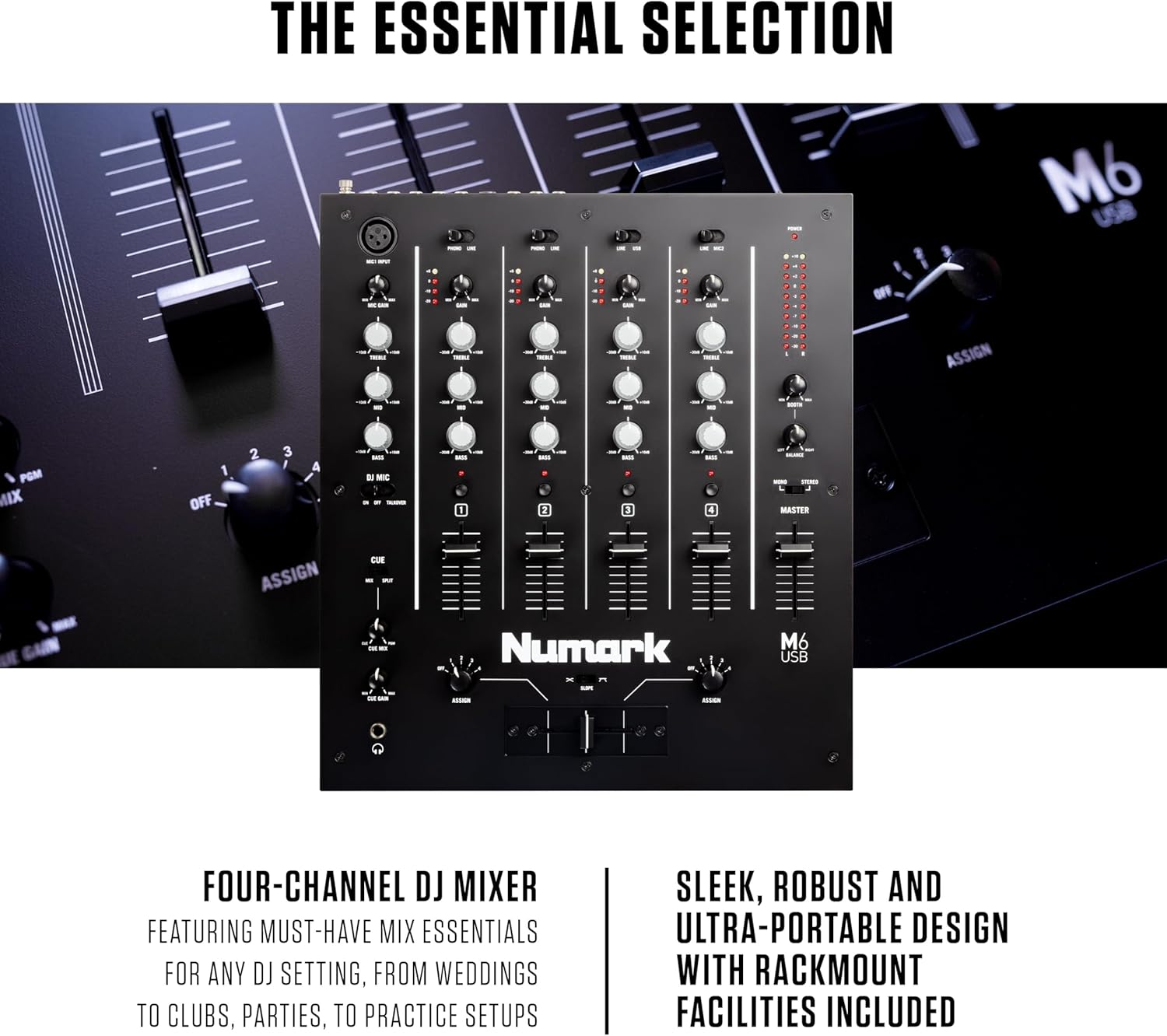
The Numark M6 USB occupies a very specific and underserved niche: it’s a physical 12-inch-form-factor four-channel stereo mixer at a price under $100. One Amazon reviewer described it directly as “the cheapest usable 12-inch 4 stereo channel DJ mixer I could find,” and that framing is accurate and useful — because at this price point, most competing products are either two-channel units or compact plastic mixers without standard channel architecture.
The M6 USB includes a built-in USB audio interface, which means you can run it as a soundcard into a laptop running Traktor, Serato, or Ableton without buying a separate audio interface. Reviewers who pair it with a Traktor setup and a hardware controller (like an Akai Launchpad or similar MIDI controller for triggering samples) report that the combination works cleanly: the mixer handles the analog signal routing from decks or CDJs, the USB handles the software return, and the Launchpad handles clip triggering without interrupting the analog signal chain. That’s a genuinely smart hybrid rig for under $200 total if you already own one of those controllers.
Honest limitations: the EQ on the M6 USB is functional but not surgical. Channel isolation (how completely you can kill a frequency band by turning the EQ to zero) is moderate by DJ mixer standards — owners report that the lows don’t fully cut even at minimum. For mixing styles that rely on aggressive EQ kills as a performance technique, this is a real constraint. Build quality is acceptable for the price; it’s not rack-mountable metal, but it’s not toy plastic either.
Verdict: If you need four analog channels plus USB interface under $100 and you’re building a hybrid hardware-software rig, the Numark M6 USB is the pick. If you’re doing paid gigs, keep reading.
Numark M2: Build Quality That Punches Up, With One Honest Quirk
The Numark M2 is a two-channel mixer, not four — but it keeps appearing in searches alongside the M6 USB because buyers comparing Numark’s entry lineup frequently land here. It’s worth a brief side note because of its unusually strong reputation for build quality at its price tier.
Spanish-language Amazon reviewers (a useful signal because that market tends to skew toward value-sensitive professional buyers rather than hobbyists) describe the M2 as “totalmente metálico” — fully metallic chassis — which is notable at its sub-$100 price. Sound quality reviews are consistently positive.
The one technical quirk worth knowing: reviewers across multiple platforms flag an inconsistency in headphone cue volume. Specifically, the cue volume is noticeably louder when the channel cue is panned hard to either extreme (fully left or fully right) than it is at the center position. For monitoring during a mix — where you’re cueing a track in one ear while the main mix plays in the other — this means your perceived level shifts as you adjust the cue pan. It’s not a dealbreaker, but it’s a habit adjustment you’ll need to make consciously. DJ Mag’s buying guides on entry mixers note that headphone monitoring consistency is frequently the first thing cut at lower price points; the M2 is a clear example of this tradeoff.
Verdict: For two-source setups (two turntables, no additional inputs needed), the M2’s build quality makes it an overperformer. But if you need four channels, it’s the wrong unit.
Yamaha MG10XU: The “Buy Once, Cry Once” Crossover Pick
The Yamaha MG10XU isn’t marketed as a DJ mixer — it’s a live-sound mixing console with a USB audio interface — but it appears consistently in four-channel standalone mixer searches because it solves a specific problem: buyers who tried one or two cheaper mixers, were disappointed by noise floor or build quality, and decided to buy something built to professional live-sound standards.
The “buy once, cry once” framing appears directly in Amazon reviews for this unit, and it’s an accurate description of the value proposition. Sound On Sound’s review of the Yamaha MG series praises the preamp quality and low noise floor as genuinely competitive with units costing significantly more. The USB interface is class-compliant (no driver installation required on most operating systems), which is a real convenience advantage.
What it doesn’t have: DJ-specific features. There’s no crossfader. EQ structure is standard live-sound parametric rather than the three-band isolator-style EQ most DJ mixers use. If your performance technique relies on crossfader cuts or three-band EQ kills, this isn’t your unit. But if you’re routing multiple hardware sources — turntables, a drum machine, a media player, a microphone — and you want the cleanest possible signal path with the most reliable build quality under $300, reviewers consistently point here.
Phono input note: the MG10XU does not include phono preamps. Turntable users will need an external phono preamp on each turntable channel. Budget roughly $25–$50 per preamp (Art DJ Pre II is the standard recommendation at that tier) or use turntables with a built-in preamp switched on.
Verdict: If you’re a home studio user, podcaster, or multi-source DJ who prioritizes audio quality and build durability over DJ-specific features, the MG10XU is the crossover buy that experienced buyers land on after outgrowing cheaper options.
A Consumer Warning: The Boytone and DSP Effects Fraud
This needs to be said plainly. The Boytone 8-channel mixer appears in this search space because of its low price and channel count, and its listed “16 DSP effects” sounds impressive on a spec sheet. Based on aggregated owner reviews, those 16 effects are not 16 distinct effects — they are a single echo effect with 16 different time/delay values. That’s one effect with 16 settings, not 16 separate effects.
Additionally, multiple reviewers flag that the included manual is a poor translation that doesn’t accurately describe the unit’s functions. For a buyer who needs reliable documentation to understand signal routing or troubleshoot a gig-night problem, this is a meaningful reliability risk.
MixMag’s guidance on mixer selection consistently warns against prioritizing channel count and effect count over signal quality and documentation quality. The Boytone is a clear case study in why.
Verdict: Skip it. The spec list overpromises in a way that will frustrate you during actual use.
Frequently Asked Questions
Do I need a mixer if I already have a DJ controller? Not for most setups. A DJ controller already has a built-in mixer section. A standalone mixer makes sense when you want to connect hardware sources (turntables, CDJs) that aren’t controlled by software, or when you want to route multiple hardware devices independently. If your entire setup runs through a laptop and software, your controller already handles mixing.
Can I connect a turntable directly to a standalone mixer without an external preamp? Only if the mixer has a built-in phono preamp on that channel — indicated by a LINE/PHONO switch on the channel strip. The Numark M6 USB and M2 include phono inputs. The Yamaha MG10XU does not. If your mixer lacks phono inputs and your turntable doesn’t have a built-in preamp, you’ll need an external phono preamp between the turntable and mixer or your audio will be very quiet and tonally incorrect.
What does a replaceable crossfader actually mean and why does it matter? The crossfader is the horizontal fader that blends between two channels — a core tool for cut-style scratching and fast transitions. On a mixer with a replaceable crossfader, that fader can be swapped out when it wears or becomes scratchy, without replacing the entire mixer. Resident Advisor’s writing on mixer longevity notes this is especially relevant for scratch DJs and mobile performers who use the crossfader heavily. Budget mixers often have non-replaceable crossfaders; professional-tier mixers (Rane Seventy-Two, Allen & Heath Xone series) have user-swappable faders as a standard feature.
Is the Yamaha MG10XU too complicated for a non-DJ home user? Probably not, based on reviewer consensus. Sound On Sound’s review notes the MG series has a clean layout and straightforward signal flow. The channel strip follows standard live-sound conventions: gain knob at the top, EQ in the middle, fader at the bottom. If you can follow a labeled diagram, you can use it. The lack of a crossfader actually simplifies things for non-DJ users who don’t need that feature.
What is the difference between a DJ mixer and a regular audio mixing board? A DJ mixer is optimized for live performance transitions: it has a crossfader, DJ-style three-band EQ (often with full-kill isolation), and a cue/headphone monitoring system designed for previewing tracks before they play to the audience. A regular audio mixing board (like the Yamaha MG10XU) is optimized for recording and live sound reinforcement: better preamps, more flexible EQ, but no crossfader and no DJ-specific cue architecture. The tradeoff is performance tools versus signal quality, and some DJs — particularly those running multi-source hardware rigs — decide the signal quality wins.
The Decision Frame
Here’s the clean version:
- If X = you need four channels under $100 with USB interface for a hybrid hardware-software rig → Numark M6 USB
- If X = you need only two channels and want the best build quality at entry price → Numark M2, with the headphone cue quirk acknowledged
- If X = you prioritize audio quality and will be running this for years, and you don’t need DJ-specific crossfader features → Yamaha MG10XU, budget an external phono preamp
- If X = you’re tempted by an 8-channel budget unit with “16 DSP effects” → stop, re-read the Boytone section, and redirect that budget toward one of the above
The standalone mixer market at four channels is genuinely thin below $300 — that’s the honest reality of why the same few units keep appearing in every search. The Numark M6 USB exists in a niche that has almost no competition. If you’re above the $300 mark and need DJ-specific features, the conversation shifts to Allen & Heath Xone:23C and Rane DJ territory, which is a different guide. But for the turntable or hardware-source DJ building out a real rig without going full professional tier, these are your actual options — and now you know exactly what each one costs you to gain and to give up.