September 4, 2026 • Roxanne Flair • 10 min reading time • Prices verified June 4, 2026
Compact DJ Controllers Under $150: The Portability Tier and Its Real Compromises
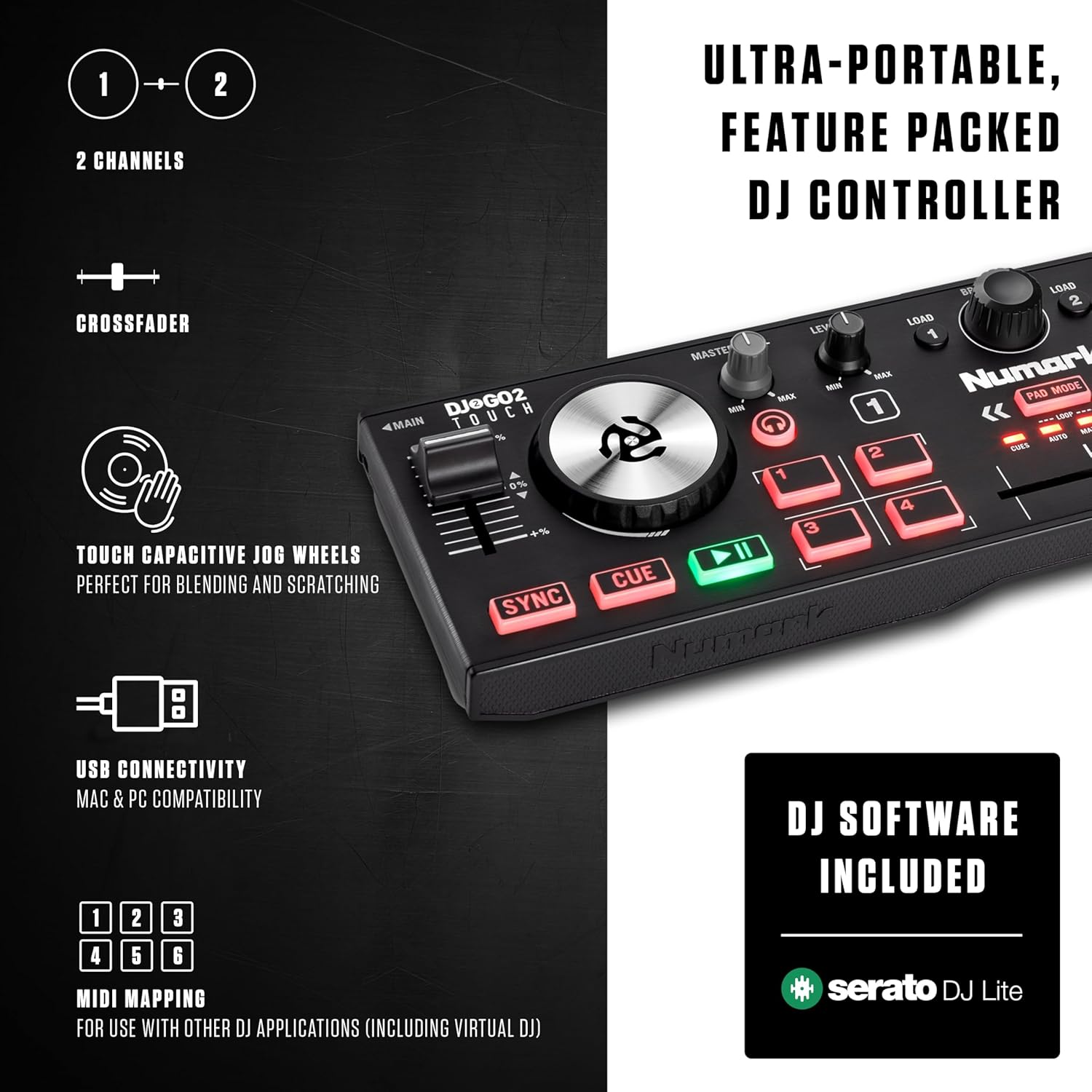
If you’ve ever thought “I just want to mix some music at a party without hauling a full setup,” you’re already thinking about the portability tier of DJ controllers — devices roughly the size of a hardcover book that connect to a laptop via USB and let you blend tracks, adjust volumes, and apply basic effects using physical knobs and buttons instead of clicking a mouse. A DJ controller is essentially a hardware remote for DJ software: it maps physical controls to the software’s virtual decks so you can cue, mix, and transition tracks with your hands. Under $150, you’ll find a cluster of these compact units — most famously the Hercules DJControl Starlight, the Numark DJ2GO2 Touch, and the Pioneer DDJ-FLX2 at the upper edge of this ceiling — and they genuinely work. But they work with real compromises, and if you’re coming to this category with any experience, you need to know exactly what those compromises are before you commit.
| EDITOR'S PICKHercules DJLearning Kit MK II | Mid-tierHercules DJControl Starlight |… | Budget pickNumark DJ2GO2 Touch Compact DJ… | |
|---|---|---|---|
| Deck count | 2 | — | 2 |
| Jog wheels | ✓ | ✓ | — |
| Built-in sound | — | ✓ | — |
| Light show | — | ✓ | — |
| Incl. speakers | ✓ | — | — |
| Incl. headphones | ✓ | — | — |
| Price | $319.99 | $109.20 | $89.00 |
| See on Amazon → | See on Amazon → | See on Amazon → |
Who Actually Buys These (And Why That Matters for Your Decision)
Aggregated owner reviews across retail platforms and DJ forums reveal two very distinct buyer profiles in this tier, and they barely overlap.
The first is the complete beginner — someone who has never touched a mixer, picked up the concept of beatmatching (manually aligning the tempos of two tracks so they don’t clash when blended), and wants the lowest-risk entry point possible. For them, these controllers deliver. The learning curve is shallow, the software bundles are functional, and breaking a $100 piece of gear feels less catastrophic than dropping a mid-range unit.
The second profile is more interesting for readers of this site: experienced DJs using these as deliberate backup or casual-use units. Resident Advisor’s gear guide for new DJs notes that working professionals often maintain a secondary setup for low-stakes environments — house parties, travel, background music at a friend’s event — where bringing a full two-channel mixer and media player rig would be overkill and a liability. One particularly telling pattern in owner reviews: a reviewer of the DDJ-FLX2 notes ownership of CDJ-3000s and a standalone media player setup, buying the compact controller purely for couch-use practice and casual listening. That’s validation of the category from someone operating at the professional end of the market.
The decision frame for this article is therefore: if you’re a practitioner, is this a smart intentional secondary purchase, or are the compromises deep enough that you’re better off skipping the tier entirely?
The Four Controllers Worth Knowing and Their Honest Tradeoffs
Hercules DJControl Starlight
The Starlight is the most discussed controller in this price range, and it has earned both genuine praise and one of the more candid critical assessments in the owner-review ecosystem. One professional DJ reviewer — who explicitly notes that other Starlight reviews were written by recipients of free units who lacked hardware knowledge — provides a technically grounded assessment that cuts through the enthusiasm.
The core usability problem the review identifies: song browsing and deck loading require an external input device (mouse or keyboard) because the existing hardware controls aren’t mapped for library navigation by default. For a beginner sitting at a laptop, this is a minor inconvenience. For a practitioner who has spent years working without touching a mouse mid-set, this is a workflow regression that eliminates the Starlight as a credible live-use unit. The software that ships with it is Serato DJ Lite — a trimmed version of the industry-standard Serato DJ Pro that lacks features like the SP-6 sample player and advanced cue management.
Sound On Sound’s review of the Starlight notes solid build quality for the price point and a functional layout, but the track-loading gap is consistently flagged as the unit’s defining limitation. If library navigation is central to your workflow, this isn’t the right tool.
Best fit: Visual learner or beginner who will keep a mouse on the desk. Hard pass as a standalone live performance unit.
Numark DJ2GO2 Touch
The DJ2GO2 Touch adds capacitive touch strips — jog wheels (the circular platters used to scratch, cue, and pitch-adjust tracks) with touch sensitivity — at a price point that usually undercuts most competitors in the tier. Scratching, for context, is the technique of manually moving a record or jog wheel back and forth against a playing track to create rhythmic cuts and stutters — a defining skill in hip-hop and battle DJ culture.
The honest report from multiple owner reviews: scratching is genuinely tricky on the DJ2GO2 Touch. The jog wheels are small and the touch sensitivity isn’t tuned for precision scratch technique. For readers who care about scratch and battle DJ skills — a significant segment of this site’s audience — that limitation is meaningful, not a footnote. The wheels are functional for basic cueing and tempo nudging, but muscle memory built on a 2GO2 Touch won’t transfer cleanly to a full-size platter.
Mixmag’s entry-level roundup positions the DJ2GO2 Touch as a strong travel companion for DJs who already have their technique locked in and need something that fits in a laptop bag — not a scratch practice tool.
Best fit: Travel backup for DJs who don’t need scratch precision. Not recommended for anyone trying to develop or maintain scratch technique.
Hercules Learning Kit MK2
The Learning Kit MK2 bundles the controller with small speakers — a package marketed squarely at beginners who don’t own a monitor setup. The hardware inclusion looks attractive on a spec sheet. In practice, at least one owner review documents a confirmed speaker defect: audible noise from the bundled speakers that persisted after testing with different cables, pointing to a hardware issue rather than a setup error.
That’s a single documented case, not a systematic failure rate, and should be weighted accordingly. But for a practitioner evaluating whether the included speakers add real value, the answer from aggregated reviews is consistently: no. The speakers are low-grade units that any experienced DJ would replace immediately. The controller itself functions equivalently to other Hercules units in this tier; you’re effectively paying a bundle premium for components you’ll likely ignore.
Best fit: Buy the controller only if you already have monitors or headphones. The speaker bundle doesn’t add utility for anyone with existing gear.
Pioneer DDJ-FLX2
At the upper edge of the sub-$150 tier (street price typically sits just under the ceiling), the DDJ-FLX2 is the unit that attracts the most interesting buyer in this category: the experienced DJ who wants a consequence-free casual unit. DJ Mag’s buying guide for 2025 identifies the FLX2 as the strongest hardware build in this price tier, with jog wheels large enough to be useful and a two-channel layout that mirrors full-size Pioneer DJ gear.
The software question matters here: the FLX2 ships with rekordbox DJ and Serato DJ Lite. Serato DJ Lite is functional but feature-limited. Serato DJ Pro — the version working professionals use — requires a separate subscription or unlock (currently around $10/month or a one-time hardware activation). The FLX2 does qualify for a Serato DJ Pro upgrade path, so the door is open, but it isn’t free.
For the practitioner use case — the CDJ owner buying this for couch practice, the mobile DJ wanting a low-stakes backup — the FLX2 is the clear pick in this tier. It’s the one controller here that won’t feel like a step backward in layout familiarity.
Best fit: Experienced DJ’s intentional secondary purchase. Best hardware in the tier. Factor in software costs if you want full Serato functionality.
By the Numbers
| Controller | Jog Wheel Size | Library Nav on Hardware? | Scratch Suitability | Included Software |
|---|---|---|---|---|
| Hercules Starlight | Small | No (mouse/keyboard required) | Low | Serato DJ Lite |
| Numark DJ2GO2 Touch | Small (touch) | Partial | Low–Medium | Serato DJ Lite |
| Hercules Learning Kit MK2 | Small | Partial | Low | DJUCED |
| Pioneer DDJ-FLX2 | Medium | Yes | Medium | rekordbox + Serato Lite |
The Decision Frame
If you’re a practitioner, the honest verdict is:
- If you want a credible backup for live use: DDJ-FLX2 is the only unit in this tier that earns that role. Budget for the Serato Pro upgrade if your workflow requires it.
- If your goal is scratch practice or technique maintenance: none of these units are suitable. Save toward a mid-range controller with full-size jog wheels.
- If you just need travel / couch / low-stakes casual use and you already have technique: DJ2GO2 Touch fits in a jacket pocket. Accept its limitations and you’ll get utility from it.
- If you’re buying for a genuine beginner: the Hercules Learning Kit MK2 bundles everything in one box at the lowest total cost, speaker defect risk noted. The Starlight is a cleaner controller buy without the bundle overhead.
The tier is real. The compromises are real. The practitioners who use these well know exactly which compromises they’re accepting.
Frequently Asked Questions
Can the Hercules Starlight browse and load tracks without a mouse or keyboard? Not by default. Owner and professional reviews consistently confirm that the Starlight’s hardware controls aren’t mapped for library navigation out of the box — browsing your track library and loading songs to decks requires a mouse or keyboard. For a beginner at a desk, this is workable. For anyone running a live set without a mouse in reach, it’s a meaningful workflow problem.
Is the Numark DJ2GO2 Touch good enough to practice scratching on? Not really. Owner reviews flag scratching as tricky — the jog wheels are small and the touch sensitivity isn’t calibrated for precision scratch technique. You can get basic cue and tempo-nudge functions reliably, but muscle memory developed on the DJ2GO2 Touch won’t transfer cleanly to a full-size platter. If scratch technique is part of your practice goals, this isn’t the right tool.
Are the speakers included in the Hercules Learning Kit MK2 worth using? For beginners with no other audio output, they provide basic functionality. For any practitioner, they add no real value — at least one owner review documents audible hardware noise from the bundled speakers even after cable-swapping. The consensus from experienced users is that the speakers are the weakest component of the bundle and are quickly replaced.
Does the DDJ-FLX2 work with Serato DJ Pro or only the Lite version? The FLX2 ships with Serato DJ Lite, which is feature-limited compared to the Pro version professionals use. However, the FLX2 qualifies for a Serato DJ Pro upgrade — either through a monthly subscription or a hardware-unlock purchase. It is not free, but the upgrade path is open. Check Serato’s current activation pricing before budgeting.
Can these compact controllers run without a laptop using standalone mode? No. Every controller in this tier requires a connected laptop running DJ software to function. None of them have standalone mode — that feature (where the unit runs independently from a USB drive or SD card) belongs to a higher hardware tier, starting with units like the Denon DJ SC series or the Pioneer DJ DDJ-XP series used alongside standalone players. If standalone capability is a requirement, this tier won’t meet it.
What’s the minimum laptop spec needed to run Serato Lite smoothly with these controllers? Serato’s published system requirements for Serato DJ Lite (as of early 2026) call for at least an Intel Core i5 or Apple M-series processor, 8GB RAM, and a 64-bit operating system (macOS 11 or Windows 10/11). In practice, owner reports suggest that older or lower-spec machines — particularly budget laptops with integrated graphics and spinning hard drives — introduce audio stuttering and latency under load. An SSD makes a meaningful difference. If your laptop is more than five or six years old or runs below 8GB RAM, test with the free Serato trial before committing to a controller purchase.